The Process to Handle Non-Txn Enquiries
Created by Nagadeep M U, Modified on Tue, 7 Apr at 4:06 PM by Nagadeep M U
The user might have issues with redemption, portfolio or investments in Mutual Funds. This document guides the agents on how they need to handle such queries and what GTIS needs to be tagged for such cases.
Sno | Process Steps | Action/ Response | GTIS |
1 | If the customer informs us that he/she is unable to redeem the entire amount that is shown in their portfolio section Or Portfolio section is showing 0 balance | Ask the customer to download the e-cas statement and share it over the ticket to help them accordingly. For AMC’s Aditya Birla/ Bandhan/ DSP/ HDFC/ HSBC/L&T/ICICI/Kotak/Navi/PPFAS/SBI/Tata/WhiteOak - Share CAMS link For AMC's Axis/ Edelweiss/ Nippon/ Groww/Quant/LIC/ Baroda/ Invesco/ UTI/ Mirae/ Motilal/ PGIM/ Sundaram - KFINTECH link Inform the customer this might be because 2 folios would’ve been created for the same fund. We will able to able check the same if you share us the e-cas statement | Group: Mutual funds Type: Portfolio Issue: Showing incorrect balance Sub Issue: Asked for more details Status: WOC |
1.1 | The customer has shared the e-cas statement | Agent to check if 2 folios are created for the same AMC. If yes, We see that two portfolios are created for the same fund. We request you withdraw from one portfolio and once you have zero units in that, please get back to us, we will map the 2nd folio. Note: In order to map the 2nd folio, the 1st folio details would be nullified. | Group: Mutual funds Type: Portfolio Issue: Showing incorrect balance Sub Issue: Info given Status: WOC |
1.2 | The customer comes back saying that he/she has redeemed from the first folio | Inform the user that we've raised this with the concerned team to check on what happened, and will give you an update before <current date + 3 Working Days>. | Group: Mutual funds Type: Portfolio Issue: Showing incorrect balance Sub Issue: To be escalated Status: Waiting on third party Team: MF ops 1 SLA: Current date+3WD |
1.3 | If multiple folios are not created as per e-cas | Inform the customer that the difference in the amount might be due to a technical issue. Inform the user that we've raised this with the concerned team to check on what happened, and will give you an update before <current date + 3 Working Days>. | Group: Mutual funds Type: Investment enquiries Issue: Technical issues Sub Issue: Portfolio not updated Status: Waiting on third party Team: MF Ops 1 SLA: Current date+3WD |
1.4 | If multiple folios are not created as per e-cas and the folio balance is less than the one shown in PhonePe App | Inform the customer that it might be because you have redeemed your funds outside Phonepe which will not get updated on the PhonePe App. Hence you might see the higher amount in his folio while redeeming but receive only the exact amount available in his folio. | Group: Mutual funds Type: Portfolio Issue: Showing incorrect balance Sub Issue:Redeemed offline Status: Resolved |
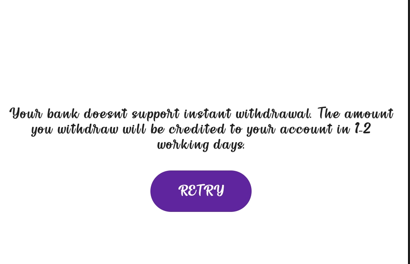
2.1 | Error screen says: ‘Bank doesn't support instant withdrawal.’ | Inform the user that we will raise this with the concerned team to check on what happened, and will give you an update before <current date + 3 Working Days>.
| Group: Mutual funds Type: Redemption related Issue: Unable to redeem Sub Issue: To be escalated Status: Waiting on third party Team: MF Ops 1 SLA: Current date+3WD |
TECHNICAL ISSUES | |||
3.1 | The customer facing issues like
| Ask the customer to check the internet connectivity and try after some time. Also, inform the customer to share a screenshot if the issue persists. | Group: Mutual funds Type: Investment enquiries Issue: Technical issues Sub Issue: Info given Status: WOC |
3.2 | If the customer reverts with screenshot | Inform the customer that we will share the details with the concerned team and will get back to you with an update within 3 WD. | Group: Mutual funds Type: Investment enquiries Issue: Technical issues Sub Issue: To be escalated Status: Waiting on third party Team: MF Ops 1 SLA: Current date+3WD |
4.1 | If CX two out of three investments fail while one is successful. And the Error code says: Your unit allocation failed due to some issues with your KYC verification. Please check your KYC status before making this investment again. or If CX says that, he was able to make payments previously, but is now facing an issues | Check the console for Purchase txns and Inform them that we will escalate this to our concerned team Share a TAT of the current date + 3 working days | Group: Mutual funds Type: Investment enquiries Issue: Technical issues Sub Issue: Multiple investment failure Status: Waiting on third party Team: MF Ops 1 SLA: Current date+3WD Note : Add the Txn IDs in private note and Txn ID field to be NA |
GENERIC MF QUERIES | |||
5.1 | What are tax-saving funds? | Tax Saving Funds, also known as Equity Linked Savings Scheme (ELSS), are equity mutual funds that allow you to enjoy tax benefits as defined under section 80C of the Income Tax Act. These funds have the lowest lock-in period of 3 years when compared to other tax saving options, such as fixed deposit (5 years), National Saving Certificate (NSC) (5-10 years), and Public Provident Fund (PPF) (15 years). | Group: Mutual funds Type: Investment enquiries Issue: Technical issues Sub Issue: Enquiry on Tax payments Status: Resolved |
5.2 | What are the benefits of investing in tax-saving funds? | If you are yet to make investments to save tax, we recommend that you get started with tax saving funds. Here are some benefits of investing in tax-saving funds on PhonePe: Save up to ₹46,800: You could save up to ₹46,800 in tax per financial year, depending on your tax bracket. Create wealth: When you invest in tax-saving funds, you earn higher returns in the long term when compared to other tax-saving options such as a bank fixed deposit (FD), National Saving Certificate (NSC) or Public Provident Fund (PPF). Lowest lock-in period: Tax saving funds have the lowest lock-in period of 3 years as compared to: Bank FD: 5 years NSC - 5 to 10 years PPF - 15 years Note: Lock-in period refers to the period of time during which you can’t sell the units you’ve invested in. Professionally managed funds: Fund managers do the research for you and carefully choose companies to invest your money in, and also continuously monitor your investments. Diversified investment portfolio: Fund managers will invest your money in companies across business sectors to diversify your investment and minimise the risk, if a company or sector doesn’t perform well. For example, if you invest just ₹1,000, you can purchase shares of as many as 40 top companies across different business sectors. So, even if a company doesn’t perform well in the stock market, you’re protected from the risk of loss. | Group: Mutual funds Type: Investment enquiries Issue: Technical issues Sub Issue: Enquiry on Tax payments Status: Resolved |
5.3 | What are the risks of investing in tax saving funds? | As tax saving funds are primarily equity funds that invest in shares of companies, their performance is linked to the stock market. However, it’s much safer to invest in tax saving funds than to directly invest in a company’s stocks for the reasons below: Professionally managed funds: Your money is managed by experienced fund managers who research thousands of companies in detail before investing your money. Diversified fund portfolio: Fund managers will invest your money in companies across business sectors to diversify your investment and minimise the risk, if a company or sector doesn’t perform well. | IGroup: Mutual funds Type: Investment enquiries Issue: Technical issues Sub Issue: Enquiry on Tax payments Status: Resolved |
5.4 | What tax benefits can I claim under Section 80C if I invest in tax saving funds? | Section 80C allows a maximum deduction of ₹1,50,000 from your taxable income. However, the total tax saving depends on your tax bracket. Refer to the table below to know how much you can save based on your tax bracket: <<Table>> Note: The government has imposed a cess of 4% for FY 2019-20 and FY 2020-21. | Group: Mutual funds Type: Investment enquiries Issue: Technical issues Sub Issue: Enquiry on Tax payments Status: Resolved |
5.5 | What is the last date to claim deduction under Section 80C for a financial year? | You can claim deduction under Section 80C on the last working day or before March 31st for a financial year. | Group: Mutual funds Type: Investment enquiries Issue: Technical issues Sub Issue: Enquiry on Tax payments Status: Resolved |
5.6 | Do I have to pay taxes on profits earned from mutual fund investments? | Yes, you will have to pay taxes on the gains that you earn after you sell your mutual funds. Tax applicable for equity funds including tax saving funds and equity-oriented hybrid funds with minimum 65% investment in equity shares of domestic companies. <<table>> Note: Since Tax Saving Funds have a 3 year lock-in period, all gains will be considered as Long Term Capital Gains. Important: The limit of ₹1,00,000 is cumulative of capital gains on all equity instruments such as stocks and equity mutual funds. Tax applicable for debt funds including liquid funds, super funds, international equity funds and hybrid funds with less than 65% investment in stocks of domestic companies. <<table>> Please consult a tax consultant or advisor for more information. | Group: Mutual funds Type: Investment enquiries Issue: Technical issues Sub Issue: Enquiry on Tax payments Status: Resolved |
5.7 | What is indexation and what are its benefits? | Indexation is used to adjust the purchase price of an investment to reflect the effect of inflation on it. This results in a higher adjusted purchase price, which effectively means a lower tax. For example, you invested ₹1,00,000 in super funds in the Financial Year 2020-21 and the value of your investment in the financial year 2023-24 is ₹1,40,000. Now, assume that the cost inflation index in 2020-21 is 300, and the cost inflation index in 2023-24 is 360. So the indexed purchased cost of this super fund will be ₹ 1,00,000 x 360/300 = ₹1,20,000 Hence, tax is payable only on ₹20,000 (₹1,40,000 - ₹1,20,000) | Group: Mutual funds Type: Investment enquiries Issue: Technical issues Sub Issue: Enquiry on Tax payments Status: Resolved |
5.8 | What if my annual income is less than the threshold amount below which income is exempt from tax? | If your annual income, even after adding the capital gains is less than the taxable income bracket of ₹2,50,000, then all of your capital gains will be tax free. For example, if your taxable income after all deductions is ₹2,00,000 and if you have earned capital gains of up to ₹50,000, then you do not have to pay any tax on the capital gains since an income of up to ₹2,50,000 is exempt from income tax. If your capital gains exceed ₹50,000 in the above example, you will have to pay long-term capital gains tax only on the capital gains over and above ₹50,000. Please consult a tax consultant or advisor for more information. | Group: Mutual funds Type: Investment enquiries Issue: Technical issues Sub Issue: Enquiry on Tax payments Status: Resolved |
5.9 | Will there be any TDS on profits earned when I sell my mutual fund investments? | No, there will be no TDS on profits earned when you sell your mutual fund investments. | Group: Mutual funds Type: Investment enquiries Issue: Technical issues Sub Issue: Enquiry on Tax payments Status: Resolved |
5.10 | Do I have to pay tax when the fund manager makes changes to the underlying funds in super funds? | No, unlike a normal portfolio or a mutual fund pack in which you are liable to pay taxes on profits everytime you move from one fund to another, all profits made through super funds when the fund manager buys and sells the underlying funds are tax free. You will only have to pay tax when you sell your super fund investments. | Group: Mutual funds Type: Investment enquiries Issue: Technical issues Sub Issue: Enquiry on Tax payments Status: Resolved |
5.11 | How will taxes be calculated if I invest through a Systematic Investment Plan (SIP)? | In case of SIPs, each SIP transaction is treated as a separate purchase transaction for tax purposes and taxes can be calculated accordingly. | Group: Mutual funds Type: Investment enquiries Issue: Technical issues Sub Issue: Enquiry on Tax payments Status: Resolved |
5.12 | Is Securities Transaction Tax (STT) applicable on selling units of mutual funds? | Securities Transaction Tax (STT) of 0.001% will be applicable when you sell units of your equity-based funds, including tax saving funds and equity-oriented hybrid funds (minimum 65% investment in stocks of Indian companies). STT will not be applicable when you sell your units of debt funds including liquid funds, super funds, international equity funds, and hybrid funds with less than 65% investments in stocks of domestic companies. | Group: Mutual funds Type: Investment enquiries Issue: Technical issues Sub Issue: Enquiry on Tax payments Status: Resolved |
5.13 | Will there be any tax implications if I switch from one fund to another? | Each fund included within the umbrella fund will be treated as a separate scheme for the purpose of taxation, and therefore any switch between types of funds will be considered as redemption from one fund and fresh investment into the other fund. | Group: Mutual funds Type: Investment enquiries Issue: Technical issues Sub Issue: Enquiry on Tax payments Status: Resolved |
OTP RELATED ISSUES | |||
6.1 | Why is OTP mandatory to withdraw Mutual Funds investments? | To safeguard the interests of Mutual Fund Investors, SEBI has mandated that all redemptions by investors in Mutual Funds need to be verified by an OTP sent to investors’ mobile number or email registered with the Asset Management Company (AMC) | Group: Mutual funds Type: Redemption related Issue type: OTP issues Sub Issue: Info given Status: Resolved |
6.2 | I didn't receive the OTP? | You can tap Resend in the Withdraw Funds screen, and you should receive a new OTP through SMS. ... If you don't receive it, please try again after checking the following: - You have strong network connectivity - Your internet connection is working - You're using the latest version of the Share.market app - You've given Share.Market the permission to send you an SMS | Group: Mutual funds Type: Redemption related Issue type: OTP issues Sub Issue: Info given Status: Resolved |
6.3 | If users say they are using the same phone number, yet are unable to get an OTP and issues persists? | This issue will be escalated with the concerned team, and will get back to you with an update by {current time + 3 working days}. Please don't worry, your money is safe. | Group: Mutual funds Type: Redemption related Issue type: OTP issues Sub Issue: Info given Status: Waiting for Third Party Team: MF Ops 1 |
6.4 | If the user receives an SMS stating a registered number different from the PhonePe number? | Route the customer to the AMC, as they would be in a better position to help. Check the AMC details and share the same with the customer. | Group: Mutual funds Type: Redemption related Issue type: OTP issues Sub Issue: Changed mobile number Status: Resolved |
7.1 | Can I invest in MF through the available fund balance | No, you can’t invest in MF with the available fund balance in Share. Market. | Group: Mutual funds Type: Investment enquiries Issue: Investment Options Sub Issue: Info given Status: Resolved |
8.1 | CX wants to import funds from a different platform on to Share.Market | Currently, we do not support importing funds from different platform to our platform. Will let you know if this feature is live. | Group: Mutual funds Type: Investment enquiries Issue: Investment Options Sub Issue: Info given Status: Resolved |
9.1 | Will my PhonePe MF portfolio details visible on Share.Market, gets updated immediately | Yes, portfolio details on PhonePe and Share.Market are updated together. | Group: Mutual funds Type: Portfolio Issue: NAV related Sub Issue: Info given Status: Resolved |
10.1 | Can I view individual MF investments made via PhonePe on Share.Market | No, you we only show a consolidated view today. | Group: Mutual funds Type: Investment enquiries Issue: Investment Options Sub Issue: Info given Status: Resolved |
11.1 | How does CRISPFund Analysis work? | CRISP byFund Analysis at Share.Marker is based on three actionable metrics designed by our experts. These metrics help assess a fund's performance, risk, and investment style. | Group: Mutual funds Type: Investment enquiries Issue: Investment Options Sub Issue: Info given Status: Resolved |
11.2 | What is Performance Consistency? | Performance Consistency measures how reliably a fund delivers returns over time. Our experts compare its 1-year returns to similar funds over the past 5 years, rank the fund annually, and calculate a consistency score. Funds in the top 33% are rated as "High consistency," the bottom 33% as "Low consistency," and the rest as "Medium consistency." This rating highlights funds that consistently perform well. | Group: Mutual funds Type: Investment enquiries Issue: Investment Options Sub Issue: Info given Status: Resolved |
11.3 | What is Risk vs Peers? | Risk vs Peers evaluates whether a fund is taking excessive risks by analyzing its return volatility over the past 5 years. We compare the fund's return fluctuations to similar funds. Outlier funds have a significantly higher risk than peers and are considered too risky. Otherwise, it falls within a normal range. | Group: Mutual funds Type: Investment enquiries Issue: Investment Options Sub Issue: Info given Status: Resolved |
11.4 | What is an Investment Style? | Investment style refers to the approach used to evaluate and select investments, focusing on different factors: Quality Factor: Assesses how well a company is managed, its profitability, and cash generation. Strong, well-managed companies often deliver better returns. Value Factor: Evaluates whether a company's stock is fairly priced based on its assets and profit-making potential. Momentum Factor: Identifies stocks with strong recent performance, based on the expectation that this trend will continue. | Group: Mutual funds Type: Investment enquiries Issue: Investment Options Sub Issue: Info given Status: Resolved |
12.1 | Can I cancel my AutoPay mandate set up through a third-party platform? | Yes, if you cancel the AutoPay mandate on the third-party platform, it will be automatically deleted in Share.Market as well. | Group: Mutual funds Type: SIP Enquiry Issue type: Manage autopay Sub issue: Info given Status: Resolved |
12.2 | Can I make SIP payments via different bank account which is not linked to Share.Market? | No, linking is mandatory. | Group: Mutual funds Type: SIP Enquiry Issue type: Manage autopay Sub issue: Info given Status: Resolved |
13.1 | Can I setup an SIP in MF using my Share.Market funds? | No, compliance requires MF investments to be deducted from your bank account directly. | Group: Mutual funds Type: Investment enquiries Issue: Investment Options Sub Issue: Info given Status: Resolved |
14.1 | What is Riskometer | The riskometer is designed to simplify the process of assessing risk in mutual funds. It provides a clear, standardized way to understand the potential risk associated with a fund's underlying portfolio. | Group: Mutual funds Type: Investment enquiries Issue: Investment Options Sub Issue: Info given Status: Resolved |
15.1 | What is the maximum period for which I can skip my SIP installment? | You can skip your SIP installment for a maximum of two months. If you skip beyond two months, your SIP will be cancelled. There is no penalty for missing an SIP installment. However, it is important to note that missing an SIP installment will reduce your overall investment amount and may also impact your returns. Note: if you miss three consecutive installments, the SIP is deleted | Group: Mutual funds Type: SIP Enquiry Issue type: Manage autopay Sub issue: Info given Status: Resolved |
16.1 | Why isn't the NAV date updated in my Mutual Fund portfolio? | The NAV (Net Asset Value) of a mutual fund is calculated at the end of the trading day. You'll typically see the updated NAV and date in your portfolio by 9 PM, in line with SEBI guidelines. | Group: Mutual funds Type: Portfolio Issue: NAV related Sub Issue: Info given Status: Resolved |
16.2 | Why am I unable to see my PhonePe MF portfolio on Share.Market? | We're currently working on integrating PhonePe Mutual Fund portfolios into Share.Market. While this feature isn't available yet, you can view a summary of your investments on Share.Market. For complete details, please refer to your PhonePe app. | Group: Mutual funds Type: Investment enquiries Issue: Portfolio related Sub Issue: Info given Status: Resolved |
17.1 | How can I get a Tax statement (ELSS) for the investments made on Share.Market? | You can get a tax statement for your mutual fund investments from the mutual fund company, CAMS, or Kfintech. You can also get a Consolidated Account Statement (CAS) . To download your ELSS statement via CAMS, Visit theCAMS website and, - Tap ELSS one view Statement -Select the Period (from and to dates) -Fill in your registered email ID and PAN -Enter Password and Submit Your ELSS statement will be sent to your registered email ID. | Group: Mutual funds Type: Statement related Issue: How to download ELSS statement Sub Issue: Steps provided Status: Resolved |
18.1 | Is it mandatory to register for the Share.market even though I am registered in PhonePe to invest in mutual funds? | No, you don't need to register again. You can simply log in to Share.Market and directly access and invest in Mutual Funds. | Group: Mutual funds Type: Investment enquiries Issue: Investment Options Sub Issue: Info given Status: Resolved |
18.2 | Is it mandatory to opt for a nominee while investing in Mutual Funds? | Yes, it's now mandatory to either add a nominee or choose to opt out of investing in Mutual Funds. You can now add up to 10 nominees. Note: Adding a nominee ensures your mutual fund investments are transferred to them if something happens to you. | Group: Mutual funds Type: KYC Issue: Nominee related Sub Issue: Info given Status: Resolved |
18.3 | Is it possible to use a different PAN card for Share.Market than the one I use for PhonePe? | Yes, you can use a different PAN card for Share.Market, but you will need to register with a different mobile number. | Group: Mutual funds Type: KYC Issue: Nominee related Sub Issue: Unable to change PAN details Status: Resolved |
18.4 | If I want to invest only in Mutual Funds, will I still have to open a demat account on Share.Market? | Yes, you need a demat account to invest in mutual funds through Share.Market. No AMC (Annual Maintenance Charge) will apply if you only invest in mutual funds. You don't have to trade stocks or other securities. | Group: Mutual funds Type: Investment enquiries Issue: Investment Options Sub Issue: Info given Status: Resolved |
18.5 | Can I have different nominees for my Equity and Mutual Fund investments? | Yes, initially the nominees you add during onboarding will cover both your Equity and Mutual Fund investments. You can then manage and change the nominees for Equity and Mutual Funds separately within your Account section. | Group: Mutual funds Type: KYC Issue: Nominee related Sub Issue: Info given Status: Resolved |
| 18.6 | If customer want to transfer the MF holdings of the demise user | Inform the customer that he/she has to reach out to specific AMC where the customer has holdings. Agent to share the AMC details. | Tagging: Group: Mutual funds Type: KYC Issue: Nominee related Sub issue: Info given Status: Pending SLA: Current time + 24 hours Tag: demise_user |
19.1 | When can I place my first order after creating my account? | You can start investing in Mutual Funds immediately after creating your account. If your KYC is rejected, your investment will be refunded within 3-4 business days. For Equity investments, you'll need to wait for your demat account to be activated, which takes approximately xx days. | Group: Mutual funds Type: Investment enquiries Issue: Investment Options Sub Issue: Info given Status: Resolved |
20.1 | I'm getting a duplicate PAN error. What should I do? | The "Duplicate PAN" error indicates that the PAN you provided is already registered with another Share Market account. To proceed, please use a different PAN that is not associated with any existing Share.Market account. | Group: Mutual funds Type: KYC Issue: Verification issues Sub Issue: Duplicate PAN Status: Resolved |
20.2 | What if the name on my bank account doesn't match the name on my PAN card or Aadhaar? | Name mismatch between your PAN, Aadhaar, and bank account will prevent account opening. Your PAN name must match your Aadhaar and bank account details. -To change your PAN name: Tap here, select Apply Online, choose Edit PAN details under Application Type, and Individual under Category."Complete the form and proceed. -To change your Aadhaar name: Tap here, tap Login, enter your Aadhaar number and captcha, tap Send OTP, enter the OTP, and tap Login. Tap Edit Aadhaar online, edit the details, have scanned documents ready, tap Proceed, update the information, submit documents, preview, pay, and note the URN. -To change your bank account name: Contact your bank for their specific procedures | Group: Mutual funds Type: KYC Issue: Enquiries Sub Issue: Info given Status: Resolved |
20.3 | Can I update the nominee details for my mutual fund investments? | Yes, you can easily update the nominee for your PhonePe mutual fund investments through the Share.Market app. Here's how: On your Share.Market app, -Go to Profile in the top left corner. -Tap Nominees. -Select Manage Nominee. -Tap Edit Nominee to make the necessary changes. -Tap Proceed to save your changes. | Group: Mutual funds Type: KYC Issue: Nominee related Sub Issue: How to update nominee Status: Resolved |
20.4 | What are Withdrawal charges and exit load? | This is the amount that the Asset Management Company (AMC) will charge an investor if they sell their units before the stipulated time. If you want to check the withdrawal charge,
Exit load: This is the amount that the Asset Management Company (AMC) charges the investor for selling their units before the stipulated time. | Group: Mutual funds Type: Investment enquiries Issue: Investment Options Sub Issue: Info given Status: Resolved |
20.5 | How to download an eCAS statement to check my folio balance? | To download the eCAS statement, 1. Tap here and select the statement type as detailed. 2. Choose the period as the current financial year and select with zero balance folios. 3. Enter your e-mail ID and set your password and then Submit. 4. You will receive the consolidated statement in your email ID shortly and you may use the same password you set to access the document. | Group: Mutual funds Type: Statement related Issue: How to download CAS Sub Issue: Steps provided Status: Resolved |
20.6 | When will I receive the money after I withdraw my investment on Share.Market? | Your portfolio will be updated depending on the mutual fund category that you have invested in. However, the time taken for the money to get added to your account differs for different mutual fund categories. Please refer to the below table: Fund Category wise Time taken for withdrawal
| Group: Mutual funds Type: Redemption related Issue: Withdrawal queries Sub Issue: Info given Status: Resolved |
20.7 | Do I have to pay tax when the fund manager makes changes to the underlying funds in Fund of Funds? | No, unlike a normal portfolio in a fund of funds you are not liable to pay taxes on profits every time your fund manager allocates your units from one fund to another depending on the market scenario. All profits made through super funds when the fund manager buys and sells the underlying funds are tax free. You will only have to pay tax when you withdraw the entire investment made in the Fund of Funds. | Group: Mutual funds Type: Investment enquiries Issue: Investment Options Sub Issue: Info given Status: Resolved |
20.8 | Will there be any tax implications if I switch from one fund to another? | Each fund included within the umbrella fund will be treated as a separate scheme for the purpose of taxation, and therefore any switch between types of funds will be considered as redemption from one fund and fresh investment into the other fund. | Group: Mutual funds Type: Investment enquiries Issue: Investment Options Sub Issue: Info given Status: Resolved |
20.9 | What is autopay and how does it work? | AutoPay is a feature that allows you to automate recurring payments for various services, including SIP (Systematic Investment Plan) contributions. Once you set up AutoPay and authorise automatic deductions, the specified amount is debited from your linked bank account on the scheduled date and transferred to the mutual fund company, broker, or service provider. This ensures timely payments without the risk of missing due dates. | Group: Mutual funds Type: SIP Enquiry Issue: What is Autopay Sub Issue: Info given Status: Resolved |
21.0 | Can I set up an SIP in MF using my Share.Market funds? | No, you will not be able to do that as the compliance requires MF investments to be deducted from your bank account directly. | Group: Mutual funds Type: SIP Enquiry Issue: Autopay-feature availability Sub Issue: Info given Status: Resolved |
21.1 | What is the maximum period for which I can skip my SIP installment, and will I be charged for doing so? | You can skip your SIP installment for a maximum of two months. If you skip beyond two months, your SIP will be cancelled. There is no penalty for skipping an SIP installment. However, it is important to note that skipping an SIP installment will reduce your overall investment amount and may also impact your returns. | Group: Mutual funds Type: SIP Enquiry Issue: Manage autopay Sub Issue: Info given Status: Resolved |
21.2 | How do I change the investment amount or date for an SIP? | To change the investment amount or date, Go to the Portfolio. Tap Orders> SIPs> Mutual funds. Select the relevant SIP you would want to Modify and Tap Modify SIP. Now, you can change the investment amount and set a new date and bank account. Tap Proceed and enter the OTP to Verify. Note: An amount of ₹2 will be deducted from your bank account if you increase your investment amount and use UPI Autopay as your mode of payment. However, this amount will be refunded within 1 hour. | Group: Mutual funds Type: SIP Enquiry Issue: How to modify SIP Sub Issue: Info given Status: Resolved |
| 22.1 | Unable to invest (SIP or Lumpsum) | Agent to check the fund name in the following list. If the fund is part of this list, then inform the user that AMC is currently not accepting new order in this fund. Try creating SIP or lumpsum payment in another fund. | Group : Mutual funds Type: Investment enquiries Issue: Investment Options Sub Issue: Info given Status: Resolved |
| 22.2 | If the fund is not part of the list | Then inform the user that we are taking an escalation and check with L2 for the reason | Group: Mutual funds Type: Investment enquiries Issue: Investment Options Sub Issue: Info given Status: WTP SLA: Current date+ 3WDs |
Sno | Process Steps | Action/ Response | GTIS | ||||||||||||||||||||||||||||
Investment-related queries | |||||||||||||||||||||||||||||||
1.1 | Is it safe to invest in mutual funds on Share.Market? | In India, the Securities and Exchange Board of India (SEBI) is the primary regulatory body for the securities market, including mutual funds hence, its safe to invest in mutual fund. | Group: Mutual Funds Type: Investment enquiries Issue: Investment Options Sub Issue: Info given Status: Resolved | ||||||||||||||||||||||||||||
1.2 | How to choose the right mutual fund? | Mutual Funds offer a variety of investment options to suit different investment goals and risk profiles. You can browse through different funds, compare their CRISP metrics, check the breakdown of Mutual Fund Holdings, and do a Peer Comparison to make an informed decision. | Group: Mutual Funds Type: Investment enquiries Issue: Investment Options Sub Issue: Routed to best SIP Status: Resolved | ||||||||||||||||||||||||||||
1.3 | what will happen to my investment on phonepe. | Your Mutual Fund investments will stay exactly as they are. You can view them on Share.Market To do so, Tap on the Portfolio tab in Share.Market home page. Click on Mutual funds option. Please be informed that Share.Market and PhonePe are two exclusive apps. Action on one app doesn’t effect the other. Note: A new folio is created on each Share.Market and PhonePe app for the first transaction with a new AMC, as portfolios on these platforms are separate. However, you can view total MF holdings on PhonePe in Share.Market. | Group: Mutual Funds Type: Investment enquiries Issue: Investment Options Sub Issue: Info given Status: Resolved | ||||||||||||||||||||||||||||
1.4 | Why should I invest in MF? | To build wealth, it’s essential to plan for the future and invest in products that offer the right balance of growth and risk. Keeping this in mind, Mutual Funds are the right choice for you! Find the right product for you based on your risk appetite, financial goals, investment size and time horizon. | Group: Mutual Funds Type: Investment enquiries Issue: Investment Options Sub Issue: Info given Status: Resolved | ||||||||||||||||||||||||||||
1.5 | What will happen to my MF holding if I close my Demat account | You should be able to access MF even after demat closure. We no longer block login for account closure cases. User will be able to login post closure and transact in Mutual Funds however, all equity-related actions will be blocked. | Group: Mutual Funds Type: Investment enquiries Issue: Investment Options Sub Issue: Info given Status: Resolved | ||||||||||||||||||||||||||||
1.6 | I already have a Demat account on Share.Market, Can I start investing in MF now | Yes, you can invest in share.market. Incase, your nominee details are not available, you may have to add nominee details to proceed with Investments. | Group: Mutual Funds Type: Investment enquiries Issue: Investment Options Sub Issue: Info given Status: Resolved | ||||||||||||||||||||||||||||
1.7 | I’m already investing in MF on PhonePe, do I need to onboard again on Share.Market | If CX is a new user to share.market, you need to start your onboarding journey from scratch. Go through all onboarding steps. However, if the user is an existing Share.Market user, he/she can start investing in MF without any onboarding process. However, if nominee details are not added, CX needs to add the same before starting the investment journey. | Group: Mutual Funds Type: Investment enquiries Issue: Investment Options Sub Issue: Info given Status: Resolved | ||||||||||||||||||||||||||||
1.8 | How do I verify or change my nominee(s) details for mutual funds? | To verify or change your nominee(s) details:
Note: If your nominee details are marked as None, it means you haven’t added any nominee(s) for your investment. This implies you’re aware that in the case of your/account holder’s death, your legal heir would need to submit all the required documents needed by the court or any such competent authority to get the mutual fund folio transferred. However, if you’ve added a nominee, please ensure you verify your nominee’s details before July 1st, 2024, to be able to withdraw your investment. | Group: Mutual Funds Type: KYC Issue: Nominee related Sub Issue: How to add nominee Status: Resolved | ||||||||||||||||||||||||||||
1.8.1 | If CX is unable to verify or change the nominee | Agent to inform CX that we will escalate the issue and get back with an update by the {Current date + 3 WD} | Group: Mutual Funds Type: KYC Issue: Nominee related Sub Issue: Unable to add nominee/ Unable to verify nominee Status: WTP Team: MF - Ops 1 | ||||||||||||||||||||||||||||
1.9 | What are elements visible under Portfolio page of Share.Market | Under Portfolio of Share.Market CX can view: Invested value, current value, Profit, Investment on PhonePe (if any), Invested funds (Their Invested value, current value, Profit) | Group: Mutual Funds Type: Investment enquiries Issue: Investment Options Sub Issue: Info given Status: Resolved | ||||||||||||||||||||||||||||
Purchase | |||||||||||||||||||||||||||||||
2.1 | How is NAV calculated? | If you’ve invested before the cut-off time i.e 11:00 a.m, on a working day, the units will be allocated as per the NAV value of the same day. If the investment is done after the cut-off time, the units will be allocated as per the NAV value of the next working day. | Group: Mutual Funds Type: Investment enquiries Issue: NAV related Sub Issue: Info given Status: Resolved | ||||||||||||||||||||||||||||
2.2 | In how many days will my units be allocated? | Your mutual fund units should be allocated within 1-2 working days after completing an investment. Ensure your investment is placed before the cut-off time on a working day for same-day processing. | Group: Mutual Funds Type: Investment enquiries Issue: Unit allocation related Sub Issue: Info given Status: Resolved | ||||||||||||||||||||||||||||
2.3 | How do I track the performance of my investments? | The Portfolio section displays all the investments that you have made in MF via Share.Market app. It allows you to view and manage all your investments in one place, monitor your entire investment portfolio, including performance and total value, in one location. | Group: Mutual Funds Type: Investment enquiries Issue: Unit allocation related Sub Issue: Info given Status: Resolved | ||||||||||||||||||||||||||||
2.4 | How does unit allocation in Share.Market work? | Purchasing mutual fund units involves allocating units to an investor. It is determined by dividing the investment amount by the fund's Net Asset Value (NAV) at the time of purchase. | Group: Mutual Funds Type: Investment enquiries Issue: Unit allocation related Sub Issue: Info given Status: Resolved | ||||||||||||||||||||||||||||
SIP | |||||||||||||||||||||||||||||||
3.1 | What is SIP? | A Systematic Investment Plan (SIP) is a method of investing in mutual funds where you invest a fixed amount of money at regular intervals. SIPs are a good way to build wealth over time, and are suitable for both new and experienced investors. | Group: Mutual Funds Type: SIP Issue: How to setup SIP Sub Issue: Steps provided Status: Resolved | ||||||||||||||||||||||||||||
3.2 | How can I skip an SIP installment? | On your Share.Market app; Tap Portfolio>> Orders>> SIPs>> Mutual Funds. Choose which fund you want to skip and tap Skip and choose Time frame. | Group: Mutual Funds Type: SIP Issue: How to skip SIP Sub Issue: Steps provided Status: Resolved | ||||||||||||||||||||||||||||
3.3 | How to delete or cancel SIP | Before sharing the steps to delete SIP, ask the customer for the reason to delete the SIP. Based on the reason customer shares try to retain the customer. If the customer is still adamant only then share the steps to deleting SIP. Common reasons and Retention template below. On your Share.Market app; Tap Portfolio>> Orders> SIPs>> Mutual Funds. Choose which fund you want to delete and tap Cancel SIP. Select the reason to cancel the SIP and tap Proceed Retention Script:
| Group: Mutual Funds Type: SIP Issue: How to delete SIP Sub Issue: Steps provided Status: Resolved | ||||||||||||||||||||||||||||
3.4 | How can I modify my SIP | On your Share.Market app; Tap Portfolio>> Orders> SIPs>> Mutual Funds. Choose which fund you want to modify and tap Modify SIP. Note: You will be able to modify the SIP date, the SIP amount, and the bank account from which the amount is being debited for the SIP. Select the appropriate option, enter the OTP, and your SIP will be modified. | Group: Mutual Funds Type: SIP modify Sub Issue: Steps provided Status: Resolved | ||||||||||||||||||||||||||||
3.5 | What is AutoPay for Monthly SIP? | AutoPay is a feature that allows you to enjoy the convenience of automated, recurring payments towards your monthly SIPs when you invest in Mutual Funds on Share.Market. Once you set up AutoPay, you don’t have to worry about missing your investment due date. You can set up your AutoPay by using UPI, net banking, or a debit card. Please note the following if you wish to set up your AutoPay using UPI: - You can only use UPI to set up AutoPay for SIP amounts up to ₹15,000 - You will only need to enter your UPI PIN for verification - You will need to make the payment for the first SIP instalment while setting up your AutoPay. Following payments will be made automatically on the SIP date you’ve set - You will not be charged any additional fee for setting up AutoPay for a new SIP. If you have an existing SIP and you wish to change the payment mode to UPI, a verification charge of ₹2 will be debited from your account. This amount will be refunded to your account within one hour For Netbanking / Debit Card: - You can only use these modes for SIP amounts up to 1 lakh - For Netbanking, you will be redirected to your bank’s login portal, where you will be requested to fill in your bank account credentials for verification - For Debit Card, you will need to fill in your card details for verification - PhonePe will not charge any additional fee for setting up Autopay for a new SIP using Net Banking/Debit Card. However, your bank may charge you a fee for verifying your bank account or setting up the AutoPay. We recommend that you check your bank’s website or contact your bank for more information - Once your bank details are verified, any future changes to your SIP AutoPay will not require any re-verification, except if you wish to change your bank Note: Please ensure that you have sufficient balance in your account before your SIP date to avoid failure of Auto Payment. | Group: Mutual funds Type: SIP Enquiry Issue type: Manage autopay Sub issue: Info given Status: Resolved | ||||||||||||||||||||||||||||
Redemption | |||||||||||||||||||||||||||||||
4.1 | How long does it take to credit the redeemed amount? | Withdrawal timelines depend on the type of fund and the fund house. It can take 1-6 working days based on the fund type. | Group: Mutual Funds Type: Redemption process Issue: Withdrawal queries Sub issue: Info given Status: Resolved | ||||||||||||||||||||||||||||
4.2 | How can I place a withdrawal request? | On your Share.Market app; Tap Portfolio>> Mutual Funds. Choose which fund you want to withdraw from and tap Withdraw. Select Withdraw all or enter the amount. Tap Withdraw and tap Confirm in the pop-up. Enter the 5-digit OTP and tap Proceed. | Group: Mutual Funds Type: Redemption process Issue: How to redeem Sub issue: Steps provided Status: Resolved | ||||||||||||||||||||||||||||
4.3 | When can I sell my MF? | "You can sell your mutual funds any time except ELSS funds. .. ELSS funds have a lock-in period of 3 years, after which you will be able to sell your funds. | Group: Mutual Funds Type: Redemption process Issue: Withdrawal queries Sub issue: Info given Status: Resolved | ||||||||||||||||||||||||||||
4.4 | Will I be charged for redemption? | No you will not be charged anything by PhonePe for redeeming the funds. However, there’ll be withdrawal charges or exit load that might be levied if you redeem the fund before stipulated time. This varies from fund to fund. To check withdrawal charges & exit load follow the below steps:
| Group: Mutual Funds Type: Redemption process Issue: Withdrawal queries Sub issue: Info given Status: Resolved | ||||||||||||||||||||||||||||
Sno | Process Steps | Action/ Response | GTIS |
1.1 | How do I complete the auto payment set-up for my SIP? | If you’re setting up an auto payment using UPI
| Group: Mutual funds Type: SIP Enquiry Issue type: Manage autopay Sub issue: Info given Status: Resolved |
1.2 | Is the verification for SIPs a one-time process? | If you’re using a bank account that’s already verified through netbanking/debit card, you don’t have to complete the verification again for any new SIP. However, you would have to complete the verification if you use a bank account that’s not verified for SIP. If you’re using UPI, you will have to complete the verification for each new SIP. | Group: Mutual funds Type: SIP Enquiry Issue type: Manage autopay Sub issue: Info given Status: Resolved |
1.3 | When will the SIP be activated? | Your SIP will be activated within 2 working days if you’ve chosen UPI as the payment mode. If you’ve selected netbanking or debit card as the payment mode, your SIP will be activated within 1 working day from the date the account verification is completed successfully | Group: Mutual funds Type: SIP Enquiry Issue type: Manage autopay Sub issue: Info given Status: Resolved |
1.4 | What if my AutoPay set-up has failed? | If your SIP auto payment set-up fails, you will immediately be redirected to the SIP set-up screen to set-up your SIP again | Group: Mutual funds Type: SIP Enquiry Issue type: Manage autopay Sub issue: Info given Status: Resolved |
1.5 | What is the verification for AutoPay set-up for monthly SIPs a one-time process? | If you’re using a bank account that’s already verified through netbanking/debit card, you don’t have to complete the verification again for any new SIP. However, you would have to complete the verification if you use a bank account that’s not verified for SIP If you’re using UPI, you will have to complete the verification for each new SIP | Group: Mutual funds Type: SIP Enquiry Issue type: Manage autopay Sub issue: Info given Status: Resolved |
1.6 | What if I’m unable to view my bank account details to complete account verification? | You may not be able to view your bank account details due to any one of the below reasons:
| Group: Mutual funds Type: SIP Enquiry Issue type: Manage autopay Sub issue: Info given Status: Resolved |
1.7 | How do I pay a missed SIP installment? | In case you missed an instalment, you can make a one-time investment {link to “How to make lump sum (One-Time) investment on Share.Market. | Group: General Enquiries Type: Mutual funds Issue type: Onetime payment Sub issue: Steps provided Status: Resolved |
1.8 | Can I cancel my investment in Share.Market? | No, you don’t have the option to cancel an investment on PhonePe. Suppose your pending investment fails for any reason. In that case, the Asset Management Company (AMC) will refund the entire amount to you within 7 to 10 working days from the date your unit allocation failed. | Group: Mutual funds Type: SIP Enquiry Issue type: Manage autopay Sub issue: Info given Status: Resolved |
1.9 | When will I receive a refund if my SIP fails and the amount is deducted? | If your payment fails, any money that was debited from your bank account will be refunded within 7 to 10 working days. | Group: Mutual funds Type: SIP Enquiry Issue type: Manage autopay Sub issue: Info given Status: Resolved |
1.10 | What is the maximum period for which I can skip my SIP installment, and will I be charged for doing so? | You can skip your SIP installment for a maximum of two months. If you skip beyond two months, your SIP will be cancelled. There is no penalty for skipping an SIP installment. However, it is important to note that skipping an SIP installment will reduce your overall investment amount and may also impact your returns. | Group: Mutual funds Type: SIP Enquiry Issue type: Manage autopay Sub issue: Info given Status: Resolved |
1.11 | I already have a folio created via PhonePe. will investing in the same AMC create a new folio? | All investments on Share.Market will create a new folio in that AMC. Your existing folio, if any, on PhonePe will remain unaffected, and you can view/manage it from PhonePe. | Group: Mutual funds Type: SIP Enquiry Issue type: Manage autopay Sub issue: Info given Status: Resolved |
Was this article helpful?
That’s Great!
Thank you for your feedback
Sorry! We couldn't be helpful
Thank you for your feedback
Feedback sent
We appreciate your effort and will try to fix the article